LUMAAI STUDIO

Operations · Analytics

LUMA KEY

Attendance and access with a single terminal

At a glance · LUMA KEY

LUMA KEY is an attendance and membership management solution made up of an attendance device placed at the store entrance and the LUMA console. Members hold up the QR code on their phone to the device, and staff record clock-in, break, and clock-out with a PIN. On supported terminals with a face camera, members and staff who have consented can also enter with their face — face data is kept encrypted inside the terminal and never stored on the server. The device instantly checks whether a time membership or visit pack remains, and all records are viewable in real time via the console and the mobile admin app.

Who it's for

  • Studios run on adult membership, like Pilates, yoga, and fitness
  • Spaces entered with a membership, like study cafés and coworking spaces
  • Adult language academies, training centers, seminar rooms, and corporate training rooms
  • Groups that need an attendance log, like clubs and regular meetups
  • Cafés, restaurants, and stores that need staff clock-in/out records
Real screen of LUMA KEY

Actual product screens · Sample member (fictional name)

If this sounds familiar

Does checking attendance and memberships take up too much staff time?

Key features

01 / 05

Member attendance device

LUMA KEY — Member attendance device

Instant attendance with phone QR

Members hold up the QR code on their phone screen to the device scanner, and attendance is done. The QR code refreshes on a short cycle, so a captured copy can't be used by someone else.

Automatic membership check and deduction

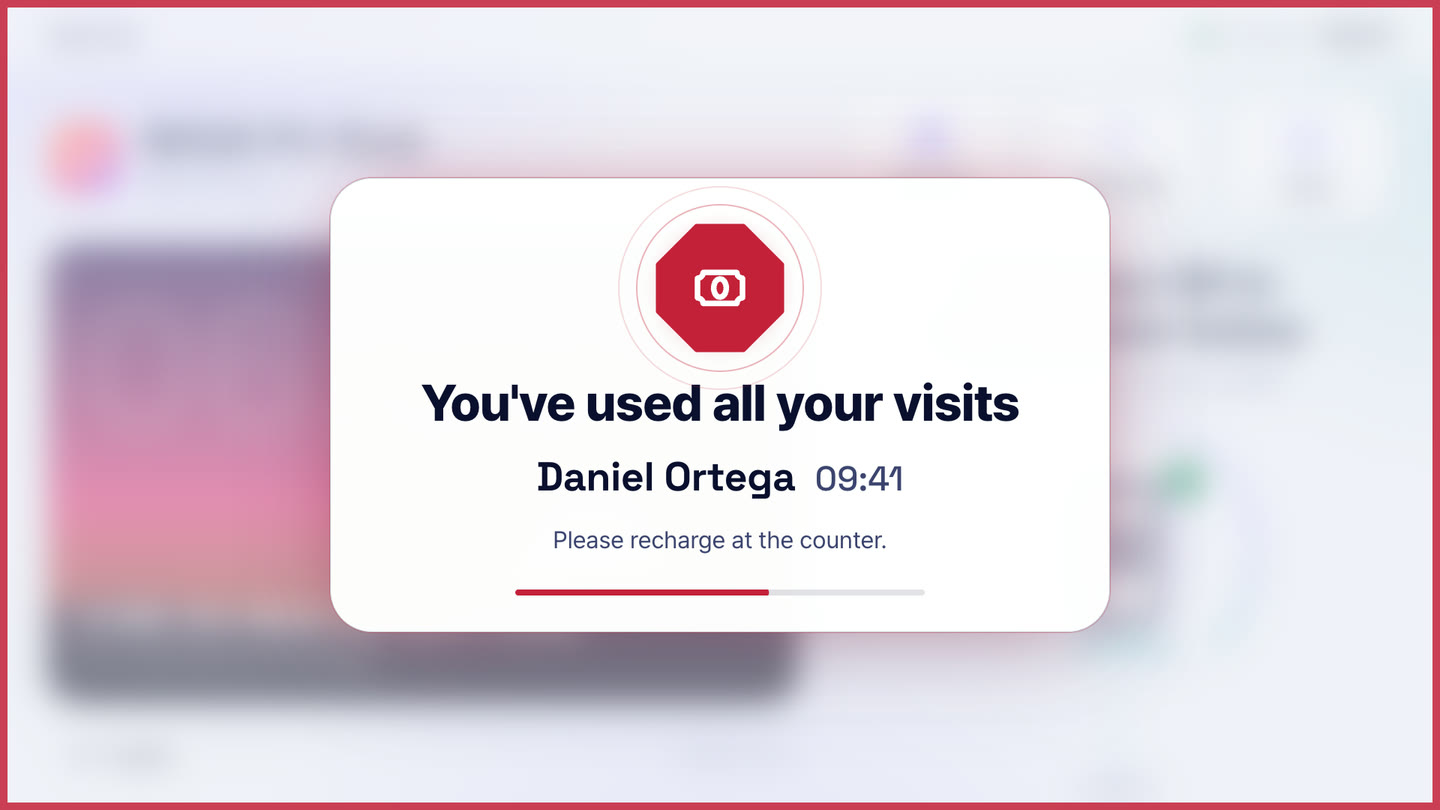
The device instantly checks time memberships, visit packs, and always-allowed status, deducting one visit each time entry is made for visit packs. If there's no membership or it's expired, the screen shows the reason, like “You've used all your visits.”

Results shown with color and voice

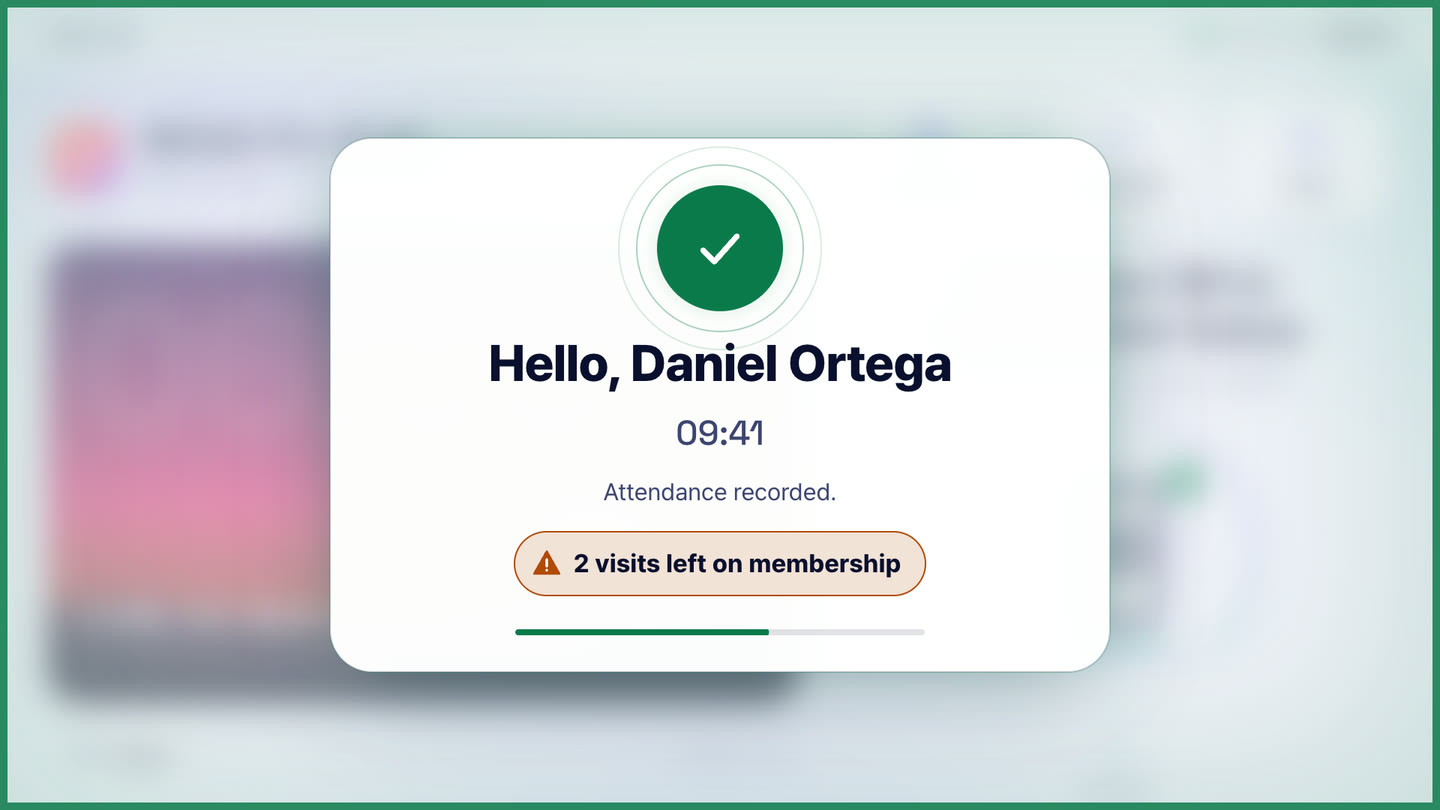
Pass, deny, or try-again results are shown instantly with on-screen color and voice. On pass, remaining membership is also announced, like “2 visits left,” so renewal timing isn't missed.

Screen and voice in 6 languages

Supports Korean, English, Spanish, Japanese, Chinese, and German. When a guest selects a language on the device, both the screen and voice switch to that language.

Attendance records kept even when offline

Member attendance is saved on the device first and automatically uploaded once the connection returns. It's only cleared from the device after confirming it's saved on the server, so records are never lost.

Manual attendance at the counter

If a member forgot their phone, counter staff can mark attendance directly from the console.

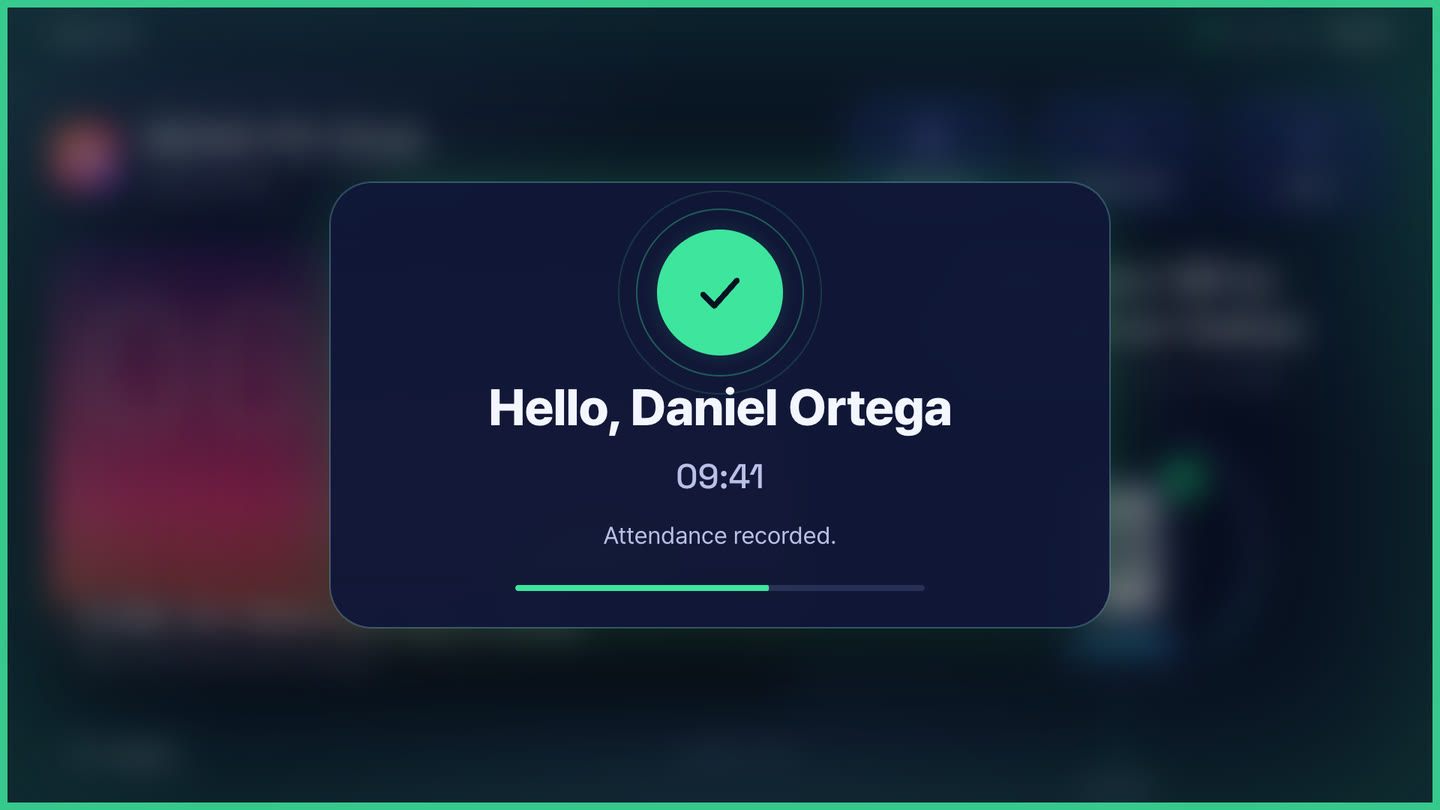
Greeted by name

If a member has agreed to show their display name, the pass screen says "Hello, [name]" so they can see right away that the terminal recognized them. The voice never says the name.
02 / 05

Member app and member management

LUMA KEY — Member app and member management

Member app with no install needed

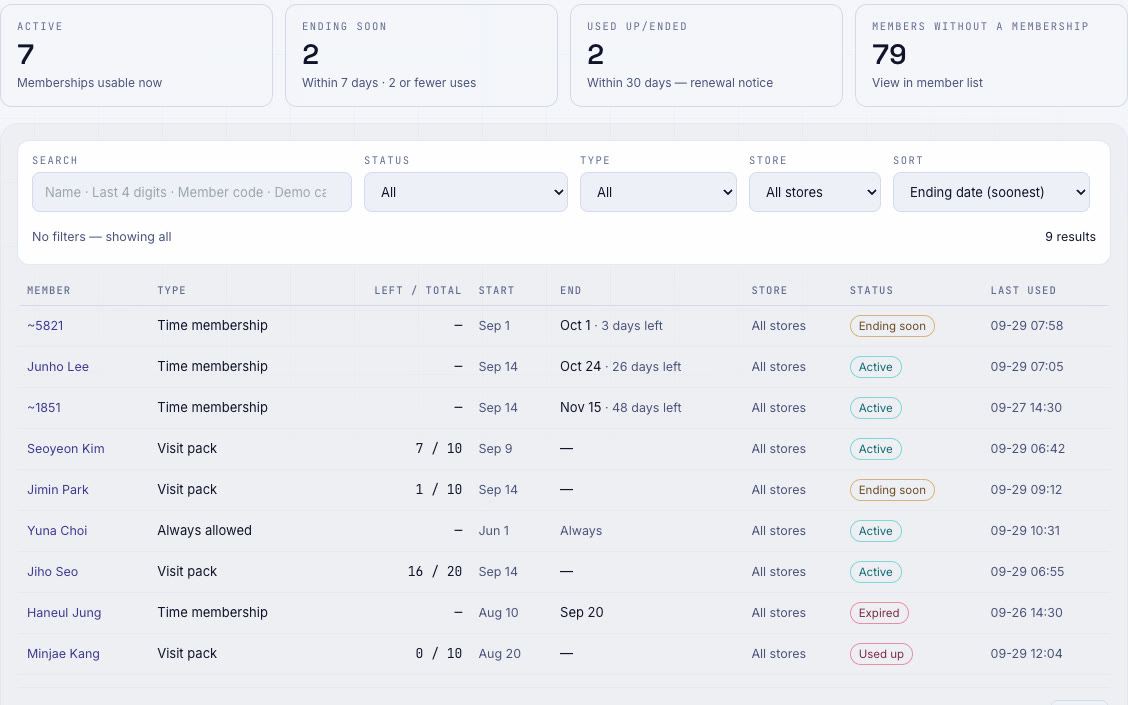
A member app added to the phone's home screen without an app store install. View your attendance QR, attendance history, and remaining membership all in one place.

Secure app registration

Registration only happens with a one-time activation code from the store and is tied to that one phone. Too many wrong PIN attempts locks it, and the app has no attendance button — attendance only happens in front of the device.

One-time link for attendees

Seminar or event attendees can hold the attendance QR received via link or printed QR up to the device, without logging in.

Member registration, consent, and membership management

Collect consent text when registering a member, and grant or adjust time memberships and visit packs. Personal data is deleted immediately on cancellation.

Where members can check in: home store or whole organization

Decide per member whether they can use only their home store or every store in the organization — one membership across all your locations.

Book meeting rooms in the member app

With LUMA Meeting Room, employees book and check in to meeting rooms from the meeting room tab in the same member app.

03 / 05

Staff time and attendance

LUMA KEY — Staff time and attendance

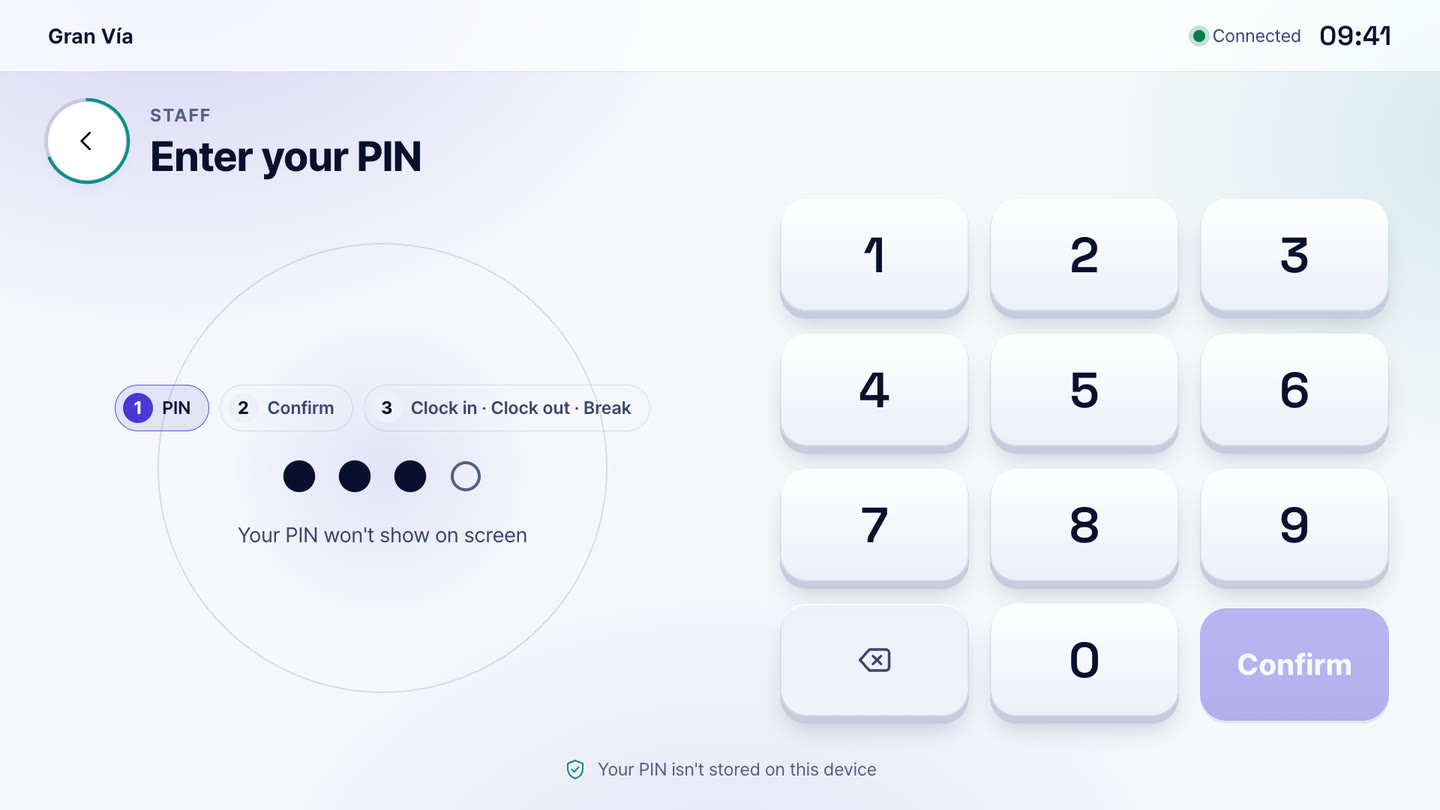
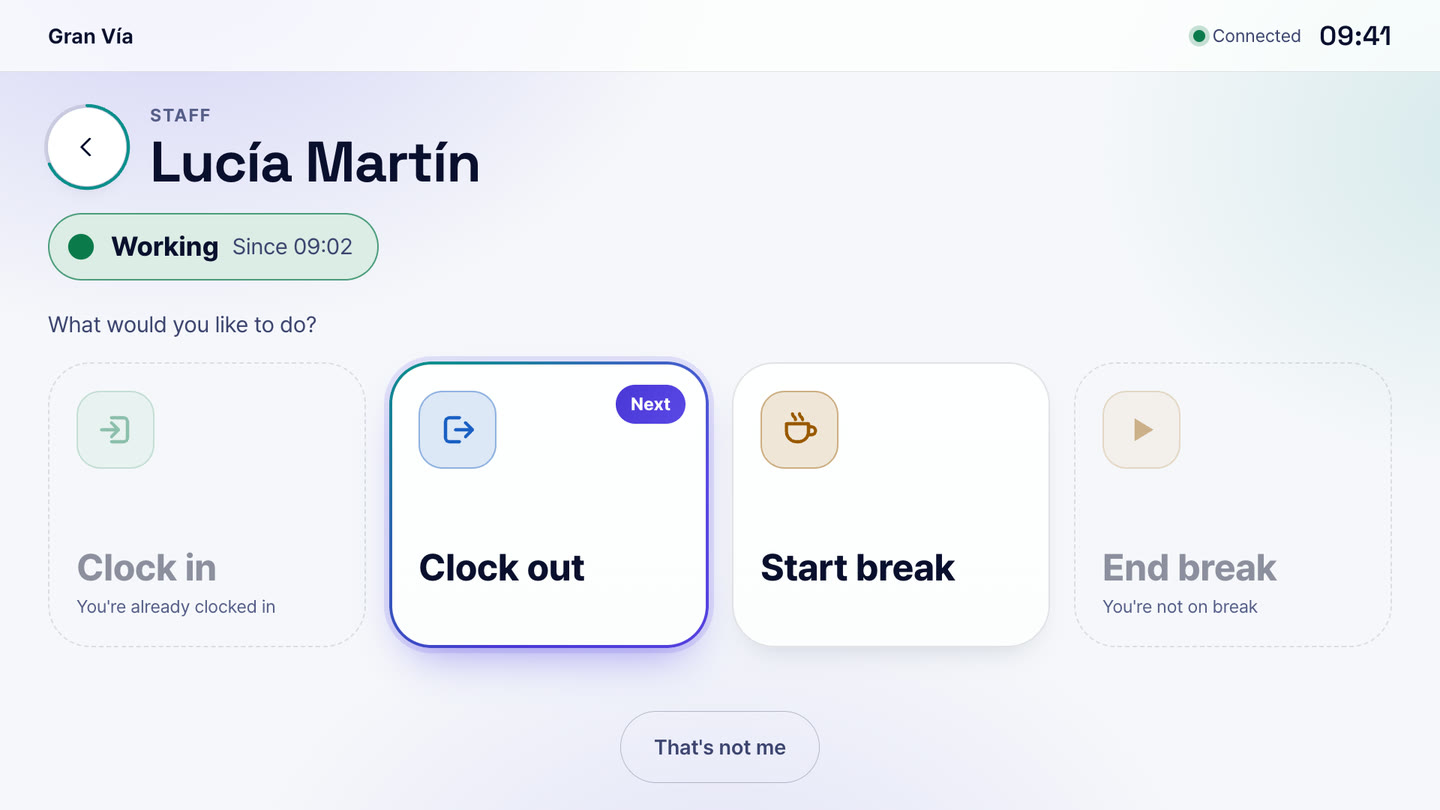
Four PIN clock-in/out buttons

Staff members enter a PIN on the device and press one of clock in, start break, end break, or clock out. It uses the same device as member attendance, but the records are managed separately.

Work records and correction history

Work hours are calculated automatically, and when corrected, the original record isn't deleted — a correction line is added showing who changed what and why.

Monthly settlement closing

Once a month's work is closed, that month's records can no longer be edited. Reopening always requires a reason to be recorded.

Clock in with your face (supported terminals)

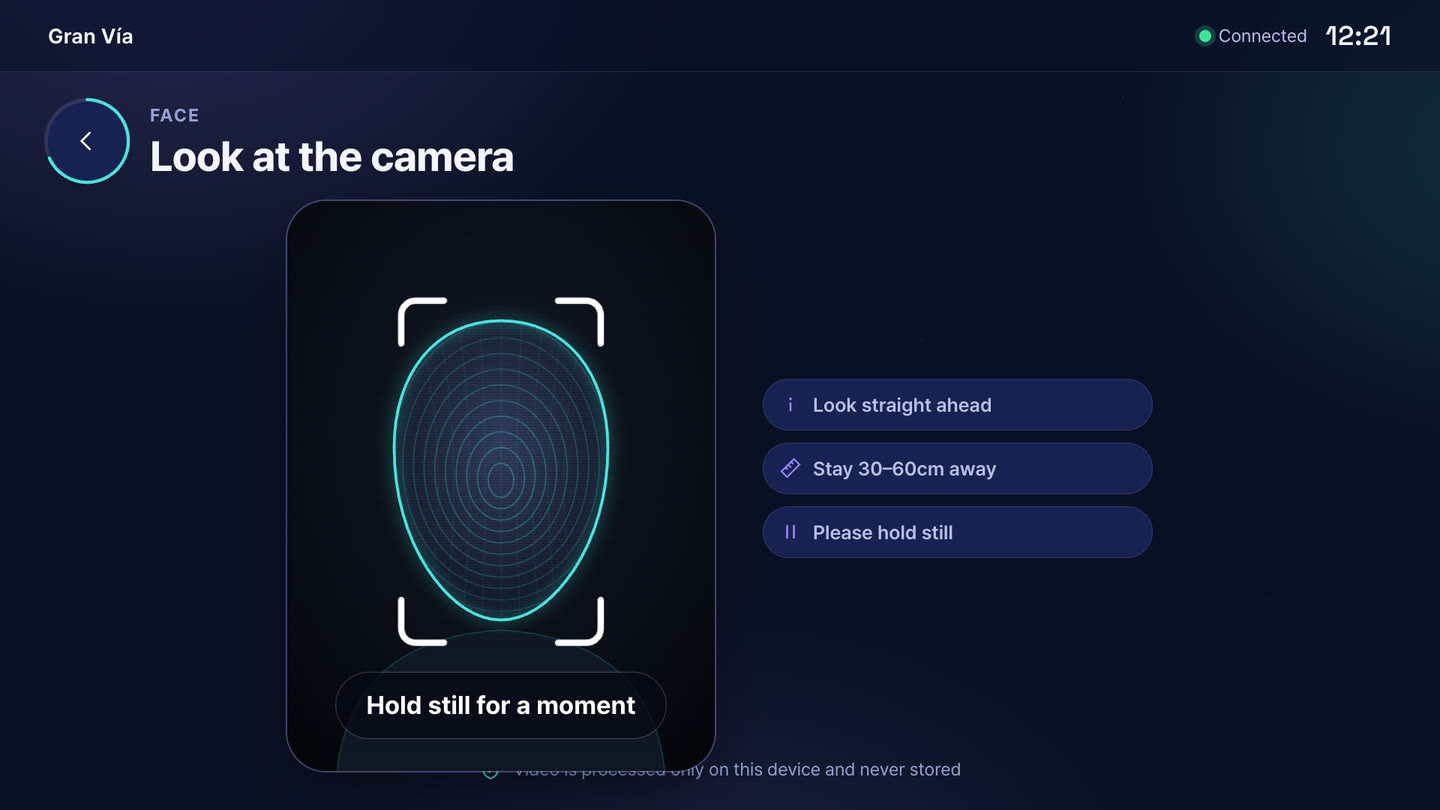
Where face entry is enabled, the terminal recognizes staff as they step up, and one tap on the confirm button records it. It suggests clock in, clock out or end break based on the moment, so there is less to choose.

04 / 05

Status & reports

LUMA KEY — Status & reports

Today at a glance dashboard

Shows the number of staff on duty, members who entered today, and rejection counts, and lets you find members and staff instantly.

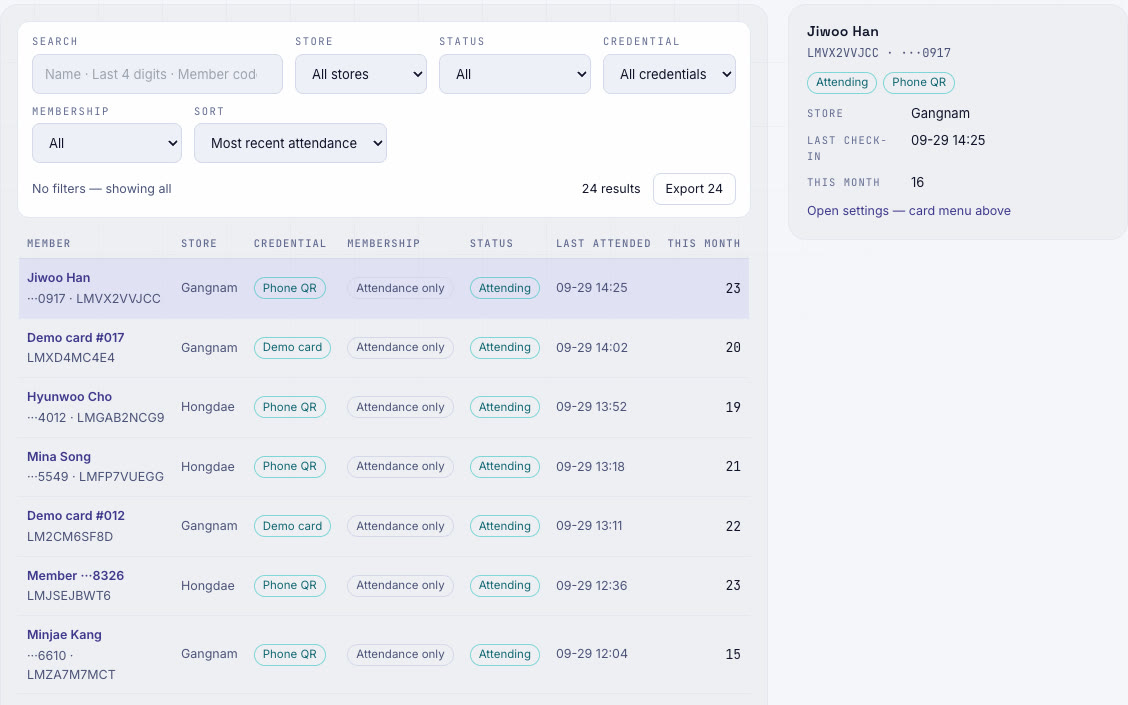
Real-time attendance log

Attendance appears in the list the moment it happens, and can be filtered by store, period, and attendance method. The same screen is also available in the mobile admin app.

Attendance report

Shows daily attendance trends, busy hours, and members who used to come but haven't come today — useful for re-engagement outreach.

Attendance log export

Download all filtered records as CSV or PDF. Only authorized users can export, and every export is logged.

Store screen headcount board

Displays a single number — “N attended today” — on the store Signage. No names or timestamps are shown.

Attendance rules & retention period settings

Decide whether to count only once per day or ignore repeated scans by the same person right after, and choose a member attendance record retention period from 3 to 36 months.

05 / 05

Face entry (optional)

LUMA KEY — Face entry (optional)

Only people who consent

Face entry is an optional feature the store turns on. Only members and staff who have given consent are enrolled; everyone else keeps using QR or PIN on the same terminal.

Face data stays on the terminal

The data used to recognize faces is kept encrypted inside the terminal. Neither face photos nor face templates are stored on LUMA servers or in the cloud.

Enrollment photos go from the store PC to the terminal

Enrollment photos are picked from a folder on the store PC and sent encrypted so that only that terminal can open them. The server only relays them without being able to see the contents, and deletes them once delivered.

For member attendance and staff time alike

With the same face entry, members check in and staff record clock-in and clock-out with a single confirmation. Membership checks and records work exactly as with QR attendance.

Blocking photos and screens held up to the cameraComing soon

We are preparing a feature that detects entry attempts using a photo or a phone screen.

Enter with just a phone, and records are kept automatically

From membership checks to staff attendance, all on one device · AI-generated video

Equipment

Runs on this equipment

LUMA box (RK3566 · RK3576)

The body of the attendance device — receives scans, checks the membership, and reports the result on screen and by voice. Setting the device role to “LUMA KEY” in the console makes it a device

Required

Touch display (15.6″ etc.)

The device screen and PIN input that members and staff see — supports both landscape and portrait installation

Required

QR scanner

Reads the attendance QR on a member's phone — automatically detects the port when connected to the box

Required

Speaker

Voice announcements for attendance results and greetings — works on screen alone with voice turned off

Optional

Member's phone

Attendance QR and member app (history, membership) — add to home screen from the browser without an app store install

Required

Admin PC & phone

Manage members, staff, and records in the LUMA console (web) and admin app — all you need is a web browser

Required

Face camera (supported terminals)

Needed for face entry — works on LUMA terminals with a camera, and face data stays inside the terminal

Optional

How it works

From setup to operation

Membership studio entry

  1. Register the member and obtain consent in the console
  2. Grant a 10-visit pack or a 1-month membership
  3. Give the member an activation code, and they register the member app on their phone
  4. The member taps the QR at the entrance device, and a green screen with “9 visits left” voice plays
  5. Members whose membership has ended are rejected with a reason, and can renew right at the counter
  6. View today's entry status in real time from the console or phone

Staff clock in/out and monthly settlement

  1. The staff member enters a PIN on the device
  2. Tap one of clock in, start break, end break, or clock out
  3. Managers check times in work records and correct any wrong entries with a reason
  4. Close the settlement period at month end
  5. Download work records as CSV or PDF and pass them to payroll

Seminar and training attendance

  1. Send an attendance link to the attendee list or print and hand out a QR code
  2. Attendees open the link without logging in to display their attendance QR
  3. Scanning at the entrance terminal records attendance
  4. The venue screen's headcount board instantly shows “N attended today”
  5. Download the attendance list when it's over

Use cases by industry

How these stores use it

Pilates and yoga studios

At a studio with many visit pack members where the front desk is often empty because instructors are teaching

Placing a LUMA KEY at the entrance lets members enter with a phone QR

The terminal checks and deducts remaining visits and announces it by voice, removing the need for manual attendance logs and visit counting

Study cafes and coworking spaces

In a space where time membership and visit pack users come and go all day

Marking only people with a valid membership as passed and flagging returning visitors as “Welcome back”

Reduces entries with expired memberships and makes renewal reminders feel natural

Adult language academies and training centers

At an adult education institution that must check attendance for every class

Students check in with a member app QR while managers view time slots and absences in reports

Cuts down attendance-checking time and lets staff reach out first to students who haven't attended recently

Seminars and in-house training

At events with many one-time attendees

Distributing an attendance link or printed QR without requiring sign-up and scanning it at the entrance

Cuts down time spent signing a list in line and lets you download the attendance list right away

Staff attendance for cafes and restaurants

At a store still recording shift workers' clock-in, breaks, and clock-out on paper

Staff enter a PIN at the terminal and tap buttons to log clock-in, break, and clock-out

Work records are collected automatically, with correction history and monthly closing giving clear grounds for settlement

Get started

LUMA KEY, tailored to your store

Tell us your store size and the equipment you use, and we'll recommend the right setup and quote. We'll also check your existing screens and printers.

  • Live demoWe'll walk you through ordering, publishing, and management on real screens.
  • Custom setup & quoteWe pick only the solutions and equipment you need based on your industry, seating, and screen count.
  • Remote support after installationCheck device status in the console, and if an issue comes up, we'll help resolve it remotely.

Specs

Attendance methods
Member phone QR (member app or one-time attendance link) · face (consenting members and staff · supported terminals) · manual check-in at counter · staff PIN
Attendance QR
Reissued on a short cycle · valid only briefly
Membership types
Time membership · visit pack · always allowed
Store rules
Membership required (denied if none) / attendance only
Staff attendance
Clock in · start break · end break · clock out · correction history · monthly settlement closing
Supported languages (screen · voice)
Korean · English · Spanish · Japanese · Chinese · German
Offline
Member attendance is stored on the device and sent automatically once reconnected
Export
CSV · PDF (authorized users only · logged)
Record retention
Member attendance 3–36 months (default 12 months) · Staff work records 4 years
Management screens
LUMA web console · Mobile admin app
Face data
Enrolled only with consent · encrypted on the terminal · never stored on servers or in the cloud

Frequently asked questions

Can people enter with their face?

Yes. On supported terminals with a face camera, members and staff who have consented can check in and clock in with their face. Face data is kept encrypted inside the terminal and is not stored on LUMA servers. Anyone not enrolled keeps using phone QR, manual check-in at the counter or a staff PIN.

Do members need to install an app to check in with LUMA KEY?

No. The member app opens in the phone's browser without an app store installation, and members simply add it to their home screen. The attendance QR refreshes at short intervals, so a captured screenshot passed to someone else won't work. Attendees who come only once just need a link or a printed QR.

Does the terminal automatically check whether a Time membership or Visit pack has any left?

Yes. The terminal checks Time memberships and Visit packs right away, and a Visit pack is deducted by one each time the member enters. If a Membership has ended, the terminal shows the reason, such as “Your period has ended”, and when a member passes through it shows the remaining visits. Places that only record attendance can be set to “Attendance only”.

Can I also record staff clock-in and clock-out with LUMA KEY?

Yes. Staff members enter their PIN on the same terminal and tap clock in, start break, end break or clock out. These records are kept separate from member attendance. When a record is corrected, the original is not deleted and a correction history is kept. After the monthly closing, that month's records can no longer be edited.

Does LUMA KEY attendance stop working if the internet goes down?

Member attendance is saved on the terminal first and uploaded automatically when the connection returns. It is deleted from the terminal only after the server has confirmed it was saved. Staff PIN clock-in/out is currently recorded only while connected, and when the connection is down, a message asks the staff member to try again.

How are LUMA KEY member information and attendance records managed?

When you register a Member, consent is collected using wording set by the Store, and when a Member withdraws, their personal information is deleted immediately. The retention period for Member attendance records can be chosen from 3 to 36 months (default 12 months), and only people with permission can export the attendance sheet, with a record kept each time it is done.

Tailor it to your store now.

Our team will help you work out the setup and quote.

Contact sales All solutions