LUMAAI STUDIO

Order · Payment

LUMA POS

Sales, purchasing, inventory, and books in one place

At a glance · LUMA POS

LUMA POS is a store operations system that manages your store's menu and pricing, order taking, purchasing and inventory, and sales ledger and daily closing all in one cloud console. The menu and prices set in POS are used as-is across kiosks, table orders, menu boards, and kitchen displays, and with a customer display at the counter, customers can check their items and total themselves. AI reads menu board photos into menu items or explains sales trends and anomalies with evidence.

Who it's for

  • Restaurants and cafes that want to manage counter orders along with kiosk and table orders under one menu
  • Franchises that want headquarters to align menus and pricing while allowing store-level adjustments
  • Stores that want to bring purchasing, inventory, and closing—previously done separately in spreadsheets—into POS
  • Stores that want to hand off VAT and sales ledgers cleanly to their accountant
  • Multi-store operators who want to catch sales anomalies and cash discrepancies without missing a thing
Real screen of LUMA POS

Actual product screens · sample store and menu (fictional)

If this sounds familiar

Managing sales, purchasing, inventory, and books separately?

Key features

01 / 06

Menu & pricing

LUMA POS — Menu & pricing

Spreadsheet-like menu and pricing editing

Edit menu items, prices, and options directly in a table like a spreadsheet, and even copy and paste tables. Switch to card view to check items along with photos.

Assign headquarters menus to stores and adjust per store

Assign a menu board created by headquarters to multiple stores, and adjust pricing and visibility per store. Changes are kept in a change history.

Fill menus with AI (menu board photos, spreadsheets)

Upload a photo of a paper menu board or a spreadsheet, and AI reads menu names, prices, and categories into an approval table. Only items you review and approve are added to the menu.

AI menu language pack

AI translates menu names and descriptions into multiple languages, and only translations approved by the store are shown on guest screens. Origin and allergen text is approved separately per item.

One pricing engine

The counter, kiosk, and menu board all use the same pricing calculation, and price change history is kept, preventing prices from differing across screens.

02 / 06

Order taking

LUMA POS — Order taking

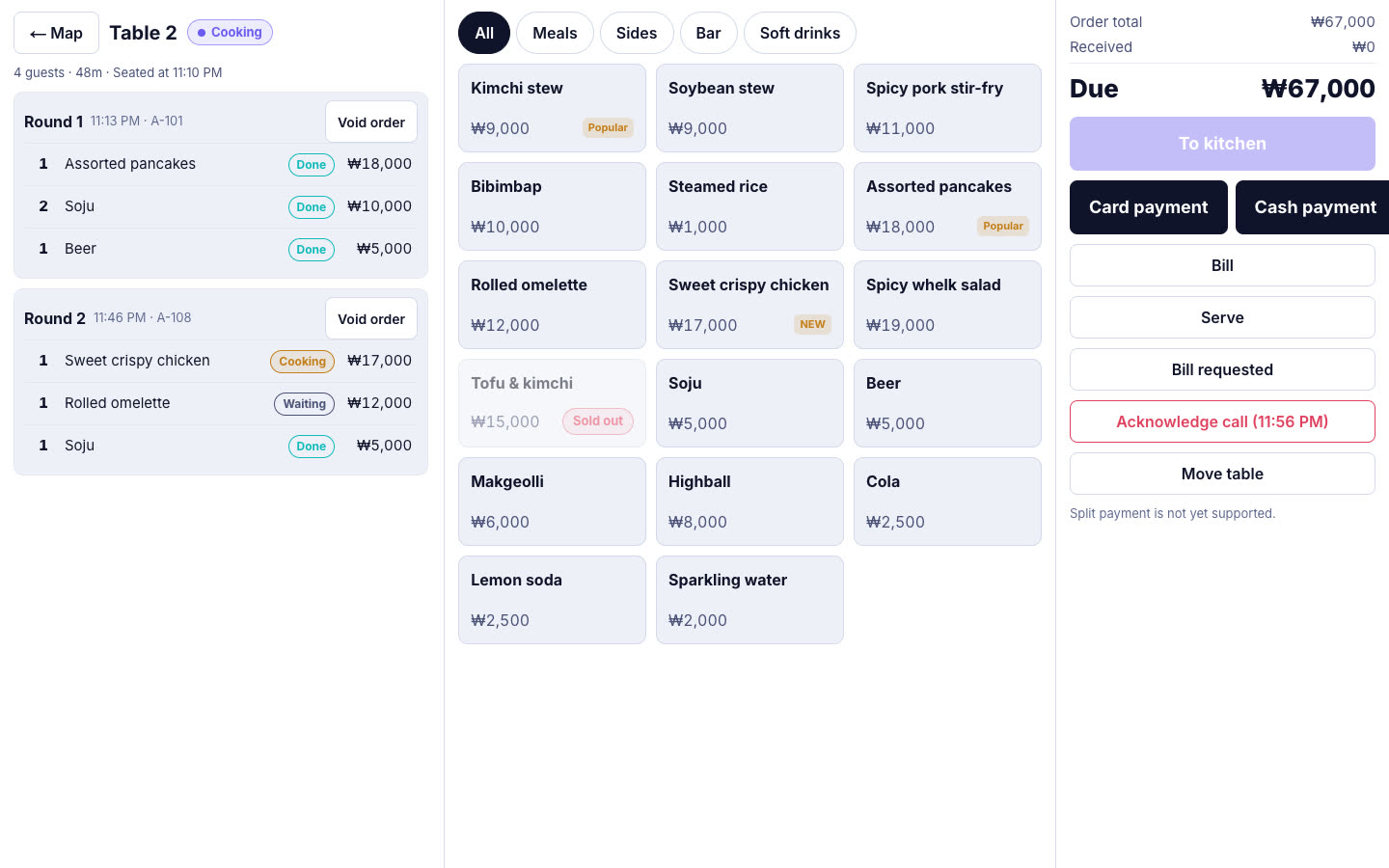
One POS screen (dedicated device)

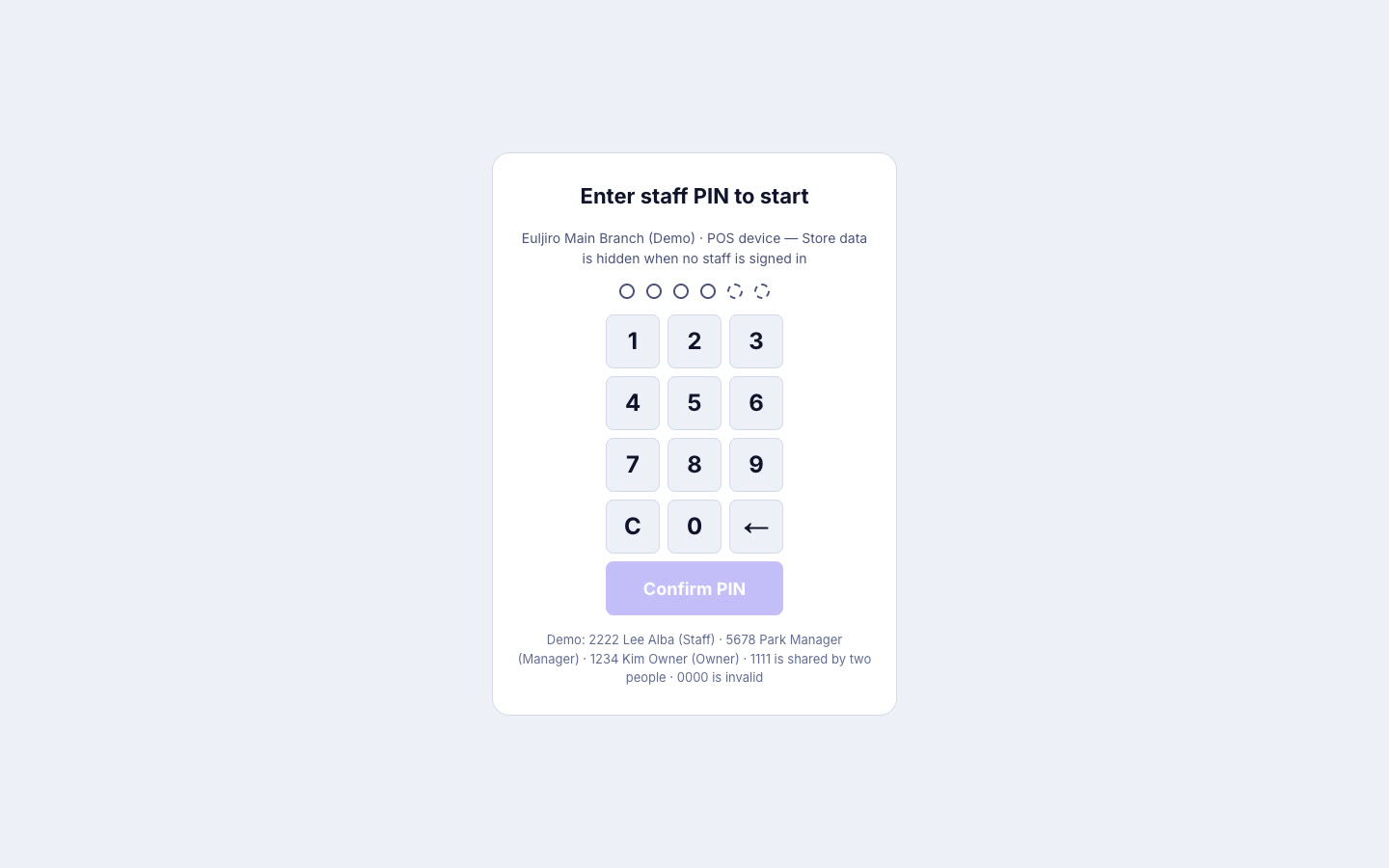
Handle tables, menus, orders, and payment all on one 15.6-inch landscape POS screen. Staff sign in with a PIN, and the screen locks when they step away.

Refunds and comps require manager approval

Sensitive actions like refunds or comps go through manager PIN approval, and it's recorded who did it on which device.

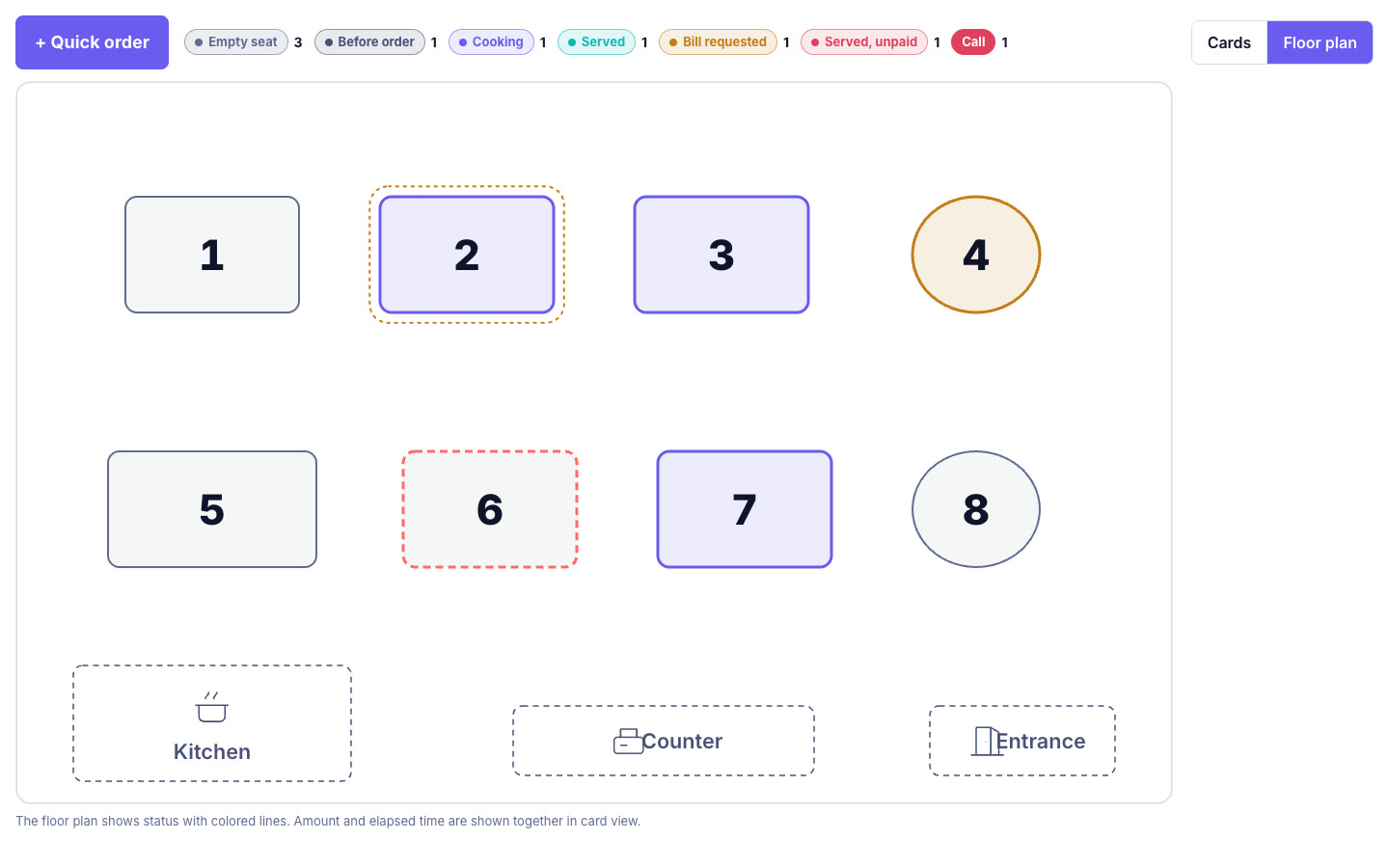
Table and floor plan management

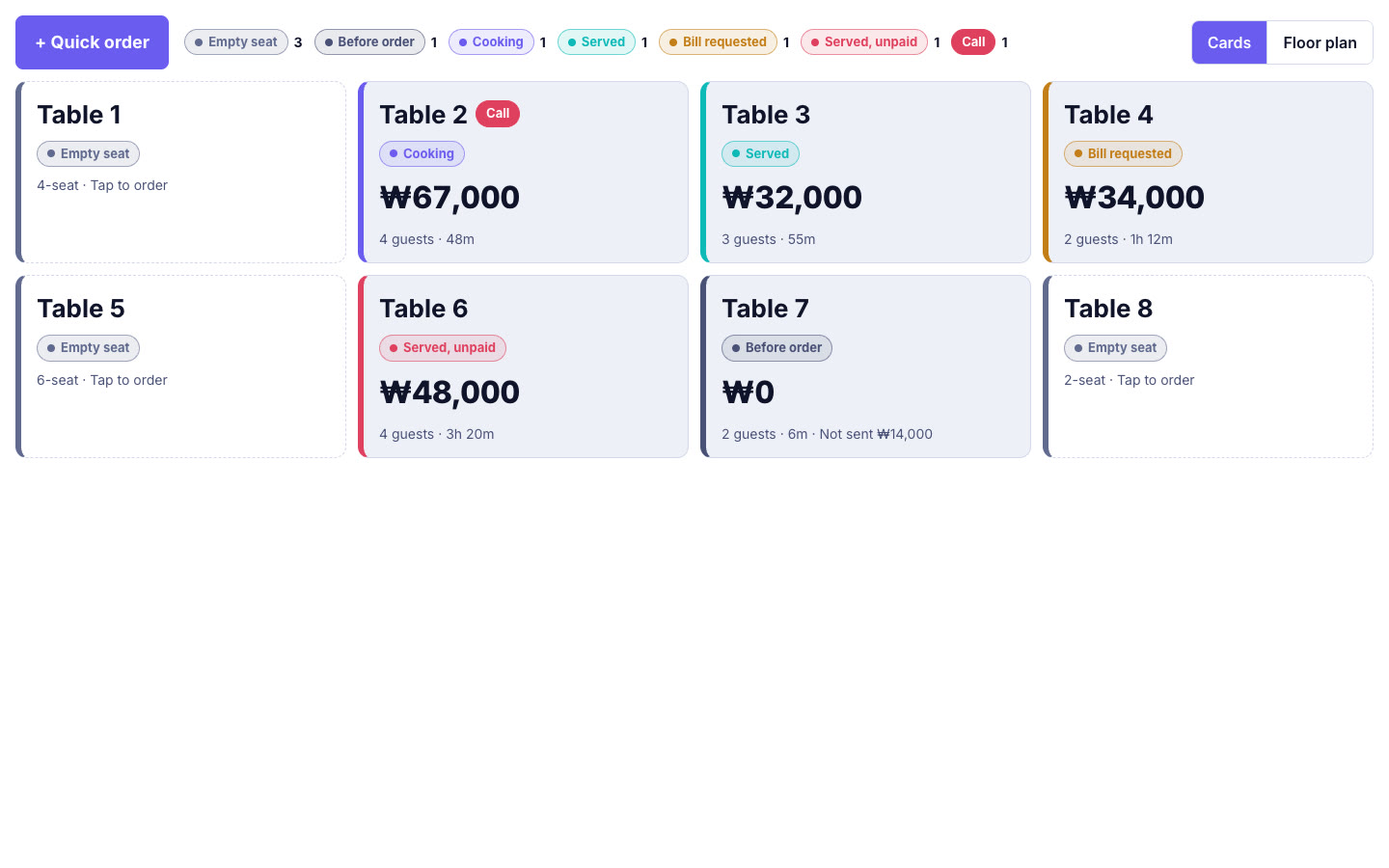
Place tables on the store floor plan and handle opening a table, moving tables, requesting the bill, settling sessions, and clearing—all on one screen.

Receipt printing

Once payment is complete, a receipt is printed through the printer connected to the POS device. Receipt text and order number rules are set in configuration.

03 / 06

Purchasing & inventory

Purchase slips & suppliers

Enter purchase slips by supplier, and deductibility is automatically determined based on the type of supporting document, while outstanding balances are also managed.

Inventory, stock counts & auto sold-out

Manage stock quantities and average cost per store, and record loss by comparing expected stock to stock counts. Items can be automatically marked sold out when stock runs out.

04 / 06

Sales, ledger & closing

LUMA POS — Sales, ledger & closing

Sales screen

See net sales (after discounts), discounts, tax, cancellations, and refunds by period and store at a glance.

Automatic sales ledger & VAT

Every sale, refund, or cancellation automatically builds a ledger by payment method and tax, which you can hand off to your accountant via the VAT screen and CSV export.

Cash drawer & Day-end closing (Z)

Record the opening float and cash in/out, then count the actual cash at closing to log any difference. Re-closing after day-end requires a PIN, and the history is kept.

05 / 06

AI insights

Anomaly detection

Flags cases where cash drawer differences continue for several days, late-night cancellations spike, or the discount/refund ratio and sales flow deviate from the usual pattern. Stores can turn rules on or off and adjust thresholds.

AI commentary with supporting evidence

AI explains today's sales flow in sentences, attaching supporting figures to each sentence and filtering out any without evidence. It never makes up numbers.

Menu profitability, reorder suggestions, heatmap

Shows profitability by menu item, ingredient reorder suggestions, and a sales heatmap by day and time slot to help with your next decision.

06 / 06

Customer display (dual screen)

LUMA POS — Customer display (dual screen)

Ads and best-sellers while waiting

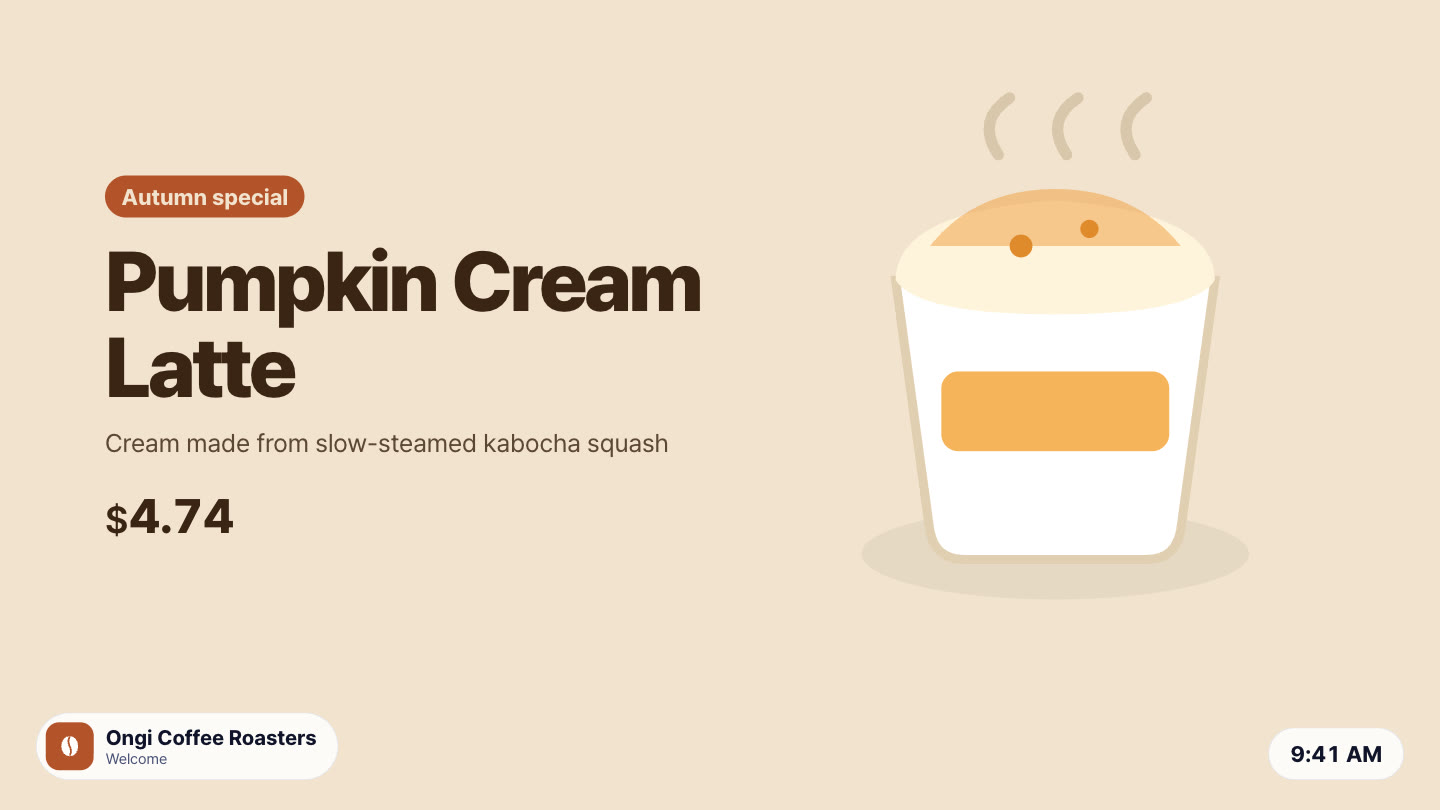
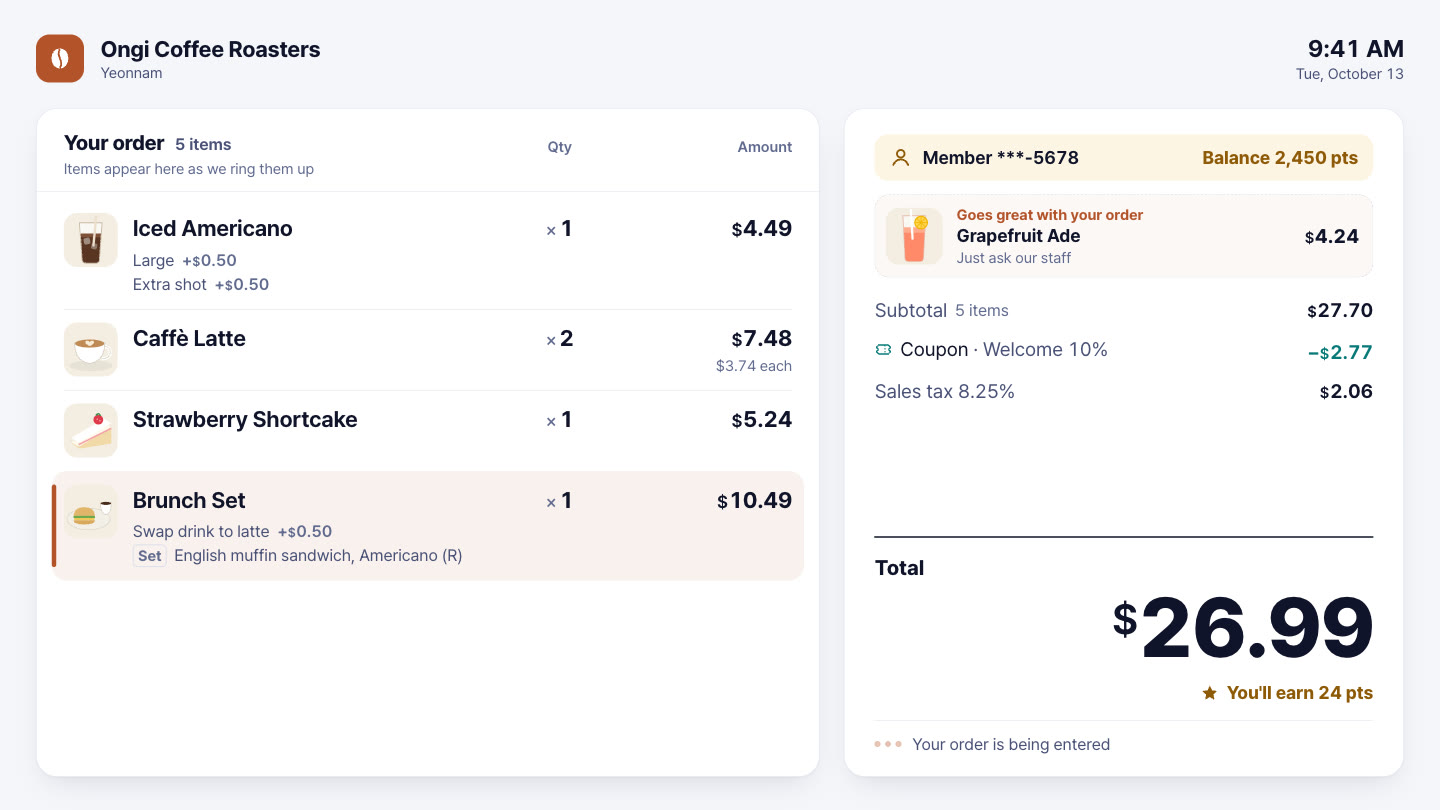
When no order is in progress, the customer display rotates ads or photos of popular menu items.

The order, as it is entered

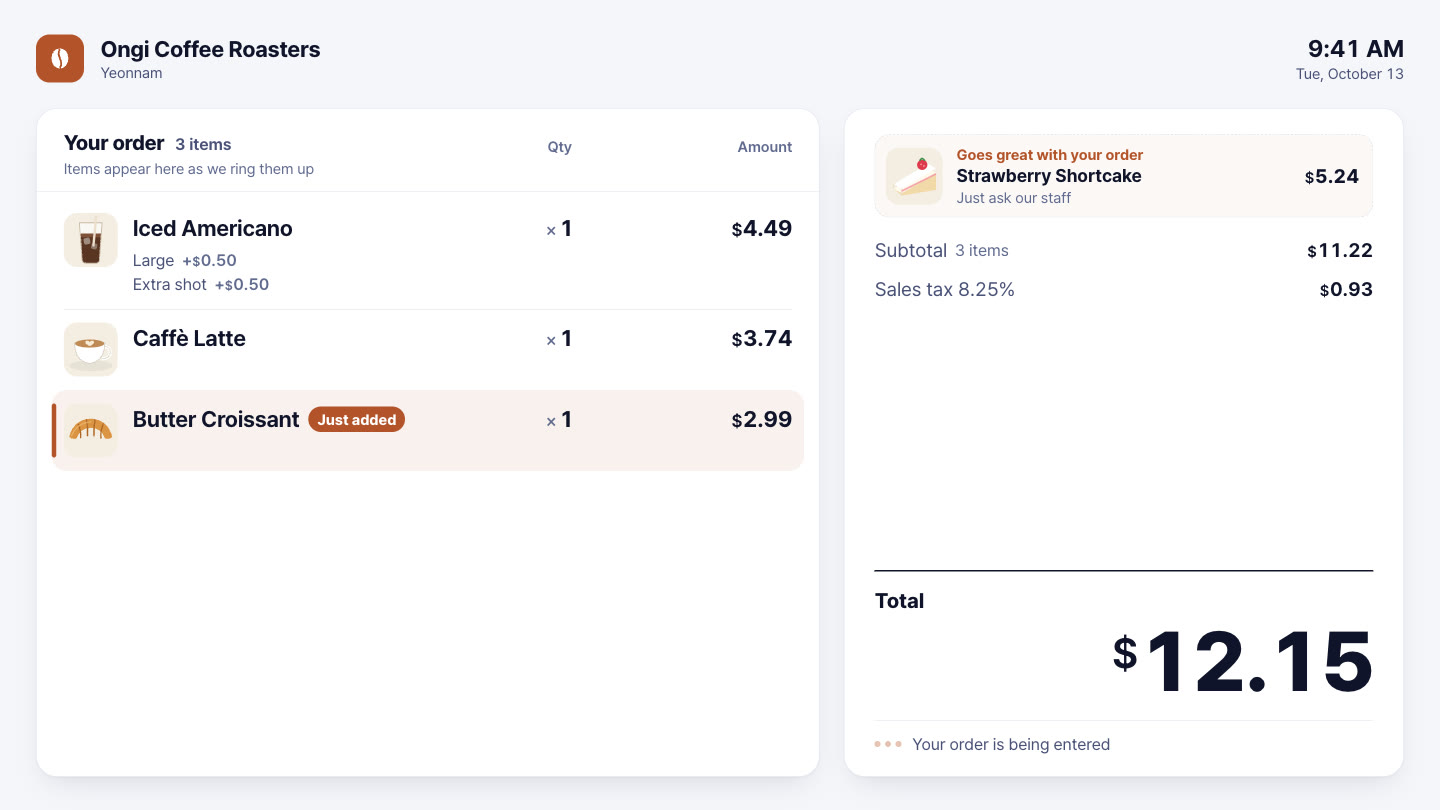
As staff add items, photos, options, set contents and prices appear on the customer display immediately, so customers can check the order themselves — fewer mistakes and disputes at the counter.

Coupons and membership

Applied coupon discounts and member information also appear on the customer display.

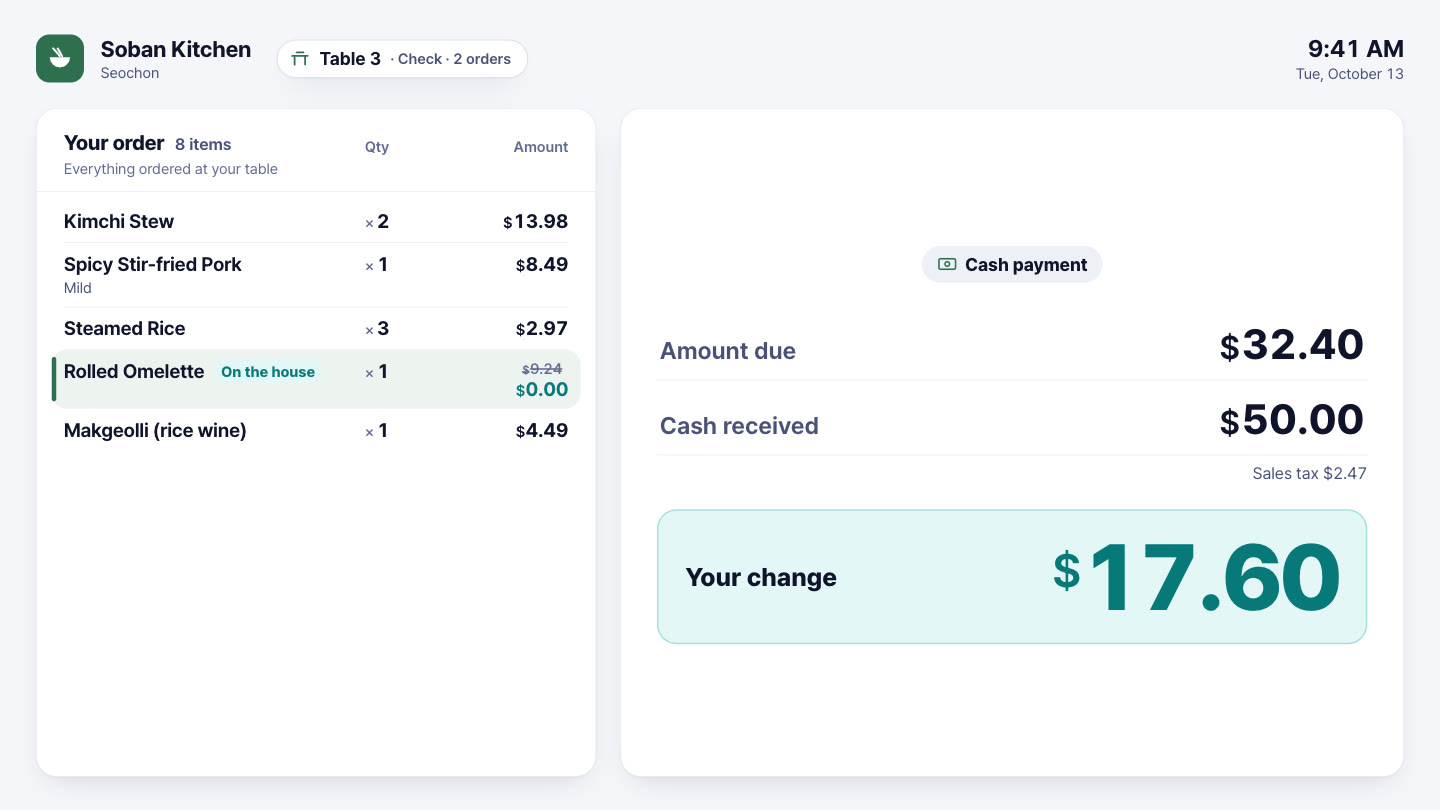
Payment steps, change and order number

While waiting for payment it shows the payment step; for cash it shows the amount received and the change, and at the end the order number in large type.

6 languages

Customer display text can be shown in Korean, English, Spanish, Japanese, Chinese or German.

From order to closing, the ledger builds itself

Change the menu once, and every screen follows · AI-generated video

Equipment

Runs on this equipment

PC / laptop

Handles admin tasks like menu, purchasing, inventory, ledger, sales, and counter order entry — just needs a web browser, no installer required

Required

POS-dedicated landscape screen (15.6″ · 1920×1080)

Staff log in with a PIN to handle tables, orders, payments, and receipts in one screen

Optional

LUMA box (RK3566 · RK3576)

Runs the POS-dedicated screen and connects the receipt printer — reports printer status to the console

Optional

Receipt printer (thermal)

Prints the receipt once payment is complete — connected to the LUMA box

Optional

Tablet / smartphone

Admin app for staff to take orders at the table — runs in a browser, no separate app install needed

Optional

Second customer display (HDMI)

A screen facing the customer at the counter — shows the order, total and payment steps (no touch)

Optional

How it works

From setup to operation

Set up a new store's menu in a day

  1. Take a photo of the paper menu and upload it
  2. Review and fix the menu items and prices AI read, in the approval table
  3. Create English and Spanish menus with the AI language pack and approve them
  4. The same menu instantly goes live on kiosks, table orders, and menu boards

Start and end of a day's business

  1. Open a cash drawer session and enter the opening float at opening time
  2. Staff log in to the POS screen with a PIN to handle orders, payments, and receipts
  3. Refunds require manager PIN approval, and the record is kept
  4. Count the cash at closing to complete day-end closing (Z), and the ledger is organized automatically
  5. The next morning, check anomaly detection and AI commentary in insights

From purchasing to inventory and cost

  1. Entering a supplier purchase slip updates inventory and average cost
  2. Inventory decreases as orders come in, and switches to sold out automatically when it runs out
  3. Weekly physical counts compare against expected inventory to log losses
  4. Decide your next purchase order using insights' reorder suggestions and menu profitability

Use cases by industry

How these stores use it

Franchise headquarters

For brands where prices and menus vary slightly by store

By assigning a headquarters menu to stores and managing per-store adjustments with a change history

You can reflect each store's circumstances while keeping to headquarters standards, and track who changed what and when

Korean and Japanese restaurants

For stores mixing table orders with counter checkout

By placing tables on a floor plan and handling seat opening, moves, and session settlement in one POS screen

Order groups by table are visible at a glance, reducing checkout mistakes

Bakery and dessert

For stores where ingredient purchasing and inventory loss determine cost

By viewing purchase slips, stock counts, and menu profitability together within the POS

You can judge with evidence which menu items actually turn a profit and where losses occur

Multi-store cafe operators

For operators who can't visit every store every day

By turning on anomaly detection rules and AI commentary

You won't miss signals like cash discrepancies, overnight cancellations, or discount spikes, and can check them first

Tourist-area stores with many foreign customers

For places that need to show menus in multiple languages

By translating with the AI menu language pack and publishing only approved translations to the customer screen

You don't need to outsource translation separately, and before approval the original text is shown so no incorrect translation is exposed

Get started

LUMA POS, tailored to your store

Tell us your store size and the equipment you use, and we'll recommend the right setup and quote. We'll also check your existing screens and printers.

  • Live demoWe'll walk you through ordering, publishing, and management on real screens.
  • Custom setup & quoteWe pick only the solutions and equipment you need based on your industry, seating, and screen count.
  • Remote support after installationCheck device status in the console, and if an issue comes up, we'll help resolve it remotely.

Specs

Usage environment
Web browser console (no install) · Dedicated POS device screen · Tablet web app
POS device screen
15.6″ · Based on 1920×1080 landscape
Console language
Korean, English, Japanese, Chinese, Spanish, German
Currency
KRW, USD, EUR, JPY, GBP, CNY, MXN, CLP
Tax ledger classification
Korea, Spain, United States, Japan
Ledger export
CSV
Payment
Card payment integration in preparation (cash, payment flow, and refund processing provided)
AI
Menu photo/Excel reading · Menu language pack · Evidence-based AI commentary (LUMA credits)
Permissions
Role-based screens · Staff PIN · Manager approval for sensitive actions · Activity logging
Customer display
Second screen (HDMI) · idle ads and best-sellers · order details · coupons and membership · payment steps · change · order number · 6 languages
Frequently asked questions

Does LUMA POS work with card payment terminals?

The prepaid and postpaid payment flows and the approval, cancellation, and refund handling are ready, while actual integration with card companies and payment providers is in preparation. Cash payments, refund handling, and the sales ledger are available now. For the schedule of payment terminal integration, please ask through the purchase inquiry.

Can I register menu items all at once from an Excel file or a photo of a menu?

Yes. When you upload a photo of a paper menu or an Excel table, the AI reads the menu names, prices, and categories and shows them in an approval table. Only the items you review and approve are added to the menu, and you can also edit directly in the table as in Excel or paste in data.

Can I hand the sales ledger over to my accountant?

Yes. Every time a sale, refund, or cancellation occurs, a ledger by payment method and tax type is built up automatically, and we provide a VAT screen and CSV export. For direct integration with a specific accounting or ERP program, please ask through the purchase inquiry.

Can I sell headquarters menu items at different prices at each branch?

Yes. You can assign a menu created by headquarters to multiple stores and adjust prices and visibility separately for each store. Changes are kept in the change history, and the counter, kiosk, and Menu Board all use the same price calculation, so prices never differ from screen to screen.

Does the AI sales commentary make up numbers?

When the AI explains today's sales trends in sentences, it attaches the numbers each sentence is based on, and sentences without supporting figures are filtered out. Patterns that differ from the usual, such as continuing cash drawer discrepancies or a cluster of late-night cancellations, are raised as anomaly alerts, and the Store can turn the rules and threshold values on or off and change them.

Tailor it to your store now.

Our team will help you work out the setup and quote.

Contact sales All solutions